The passive tree: read the room before you spend
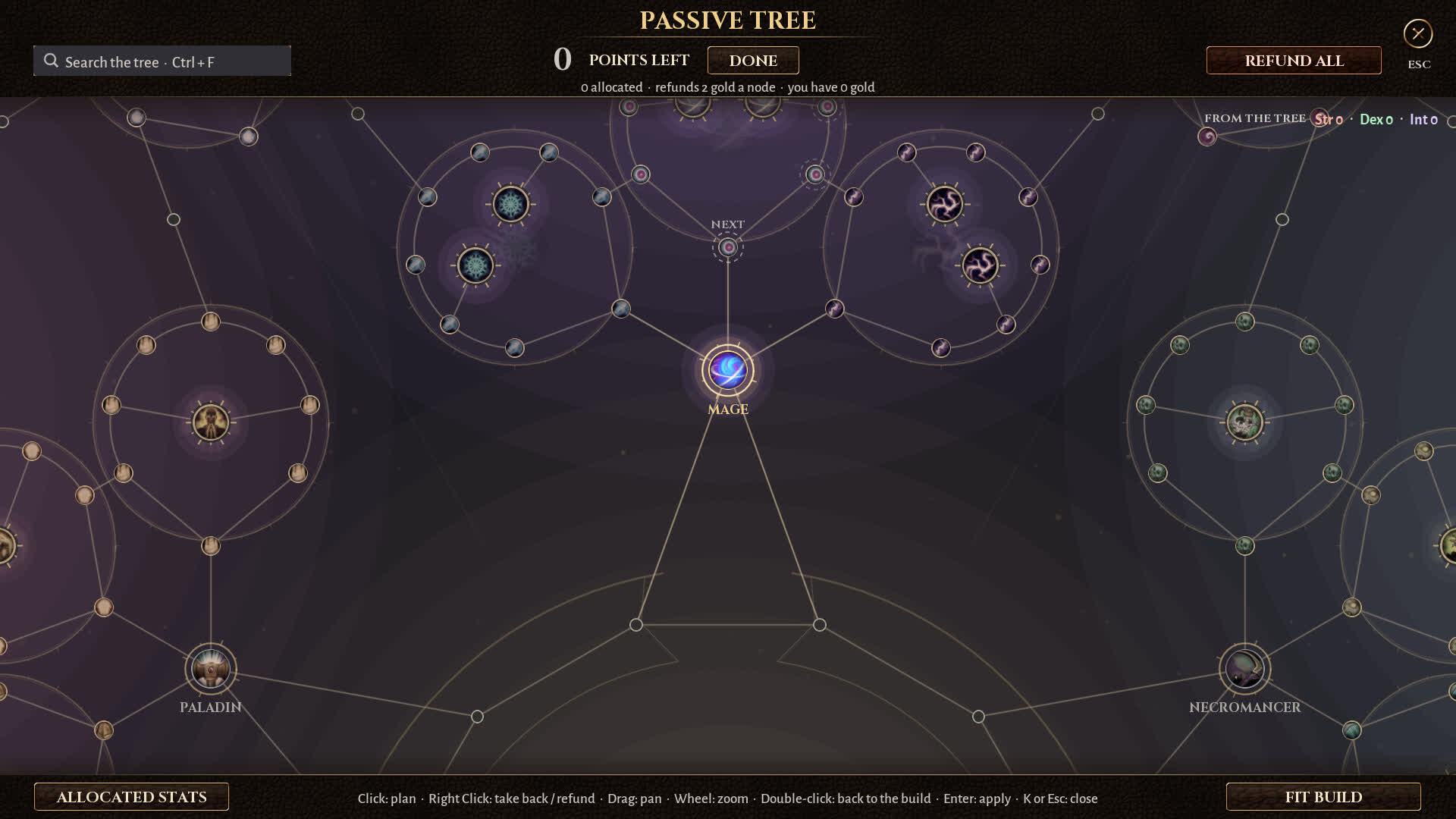
The passive tree screenshot is the most information-dense official image we have. It shows class starting nodes, radial clusters, a search field, a refund-all button and an explicit control scheme. It does not show the full tree — but it shows enough to plan like an adult.
What the screen actually shows
| Element | Detail | Why it matters |
|---|---|---|
| Class start | Large circular nodes labelled Mage, Paladin, Necromancer — likely one per class | Your starting position shapes the first 20 points more than any single notable |
| Points | “0 POINTS LEFT” in the screenshot | The tree is point-budgeted; you cannot take everything |
| Refund | “REFUND ALL”; “refunds 2 gold a node” | Gold is a respec currency in the shown build |
| Attributes | Str • Dex • Int in the top right | Attribute requirements probably gate gems and gear |
| Search | “Search the tree · Ctrl+F” | The tree is large enough to need search — use it |
| Notables | Larger circular nodes with unique icons | These are the build-defining picks |
| Keystones | The store mentions keystones; the screenshot shows large outer nodes | Expect trade-off nodes that change a rule |
| Controls | Left click plan, right click refund, drag pan, wheel zoom, Enter apply, K/Esc close | You can plan without committing |
A planning method that survives patches
-
Start from the skill, not the class
Write down your main skill’s damage type and weapon. Then search the tree for the matching cluster. The class start only decides how many points the route costs.
-
Take the shortest route to two notables
Two good notables beat six mediocre small nodes. The tree rewards focus because every point spent travelling is a point not spent scaling.
-
Buy defence before the first wall
Life, armour, evasion, block or minion durability. In a randomised map you cannot out-level the next pack forever.
-
Only then take a keystone
Keystones change a rule and usually impose a cost. Take one when your build already functions without it, so you can feel what it changes.
-
Keep 10–15 points unplanned
You do not know which unique or support will drop. A tree with no flex is a tree you will refund.
Why the class start matters
The screenshot places class nodes around a central ring: Mage at the top-centre, Paladin at the lower-left and Necromancer at the lower-right. If all six are arranged around the same wheel, the distance from your start to a damage cluster is a real cost. A Warrior pathing to the Mage’s elemental cluster will spend points on travel that a Mage spends on damage.
Build codes and the tree
Two playtest creators posted strings beginning BO1. — one for a Samurai Cyclone, one for a Mage tree. That strongly suggests the game can export a build, probably including the passive path. If it does, the tree is shareable in a way that most ARPGs make you reconstruct by hand.
Refunds and gold
The screenshot says “refunds 2 gold a node” and “you have 0 gold”. That tells us respecs are possible in the shown build and that gold is the cost. It does not tell us whether the price scales, whether there is a free respec window, or whether gold is plentiful at endgame.
- Do not refund a node to chase a 5% damage increase. The gold is better spent on gear.
- Refund travel nodes when you change weapon type; they are the cheapest way to recover a path.
- If the game gives a free respec after the tutorial, use it to test two tree shapes before committing.
- Keep a screenshot of your tree before a big refund. The UI may not have an undo history.
Launch checklist
- Find your class node and count the shortest path to the nearest weapon cluster.
- Search the tree for your main skill’s damage type before spending a single point.
- Identify one notable that fixes a weakness, not one that adds more of your strength.
- Check the attribute requirements on your planned gems; the tree shows Str/Dex/Int for a reason.
- Plan 30 points, not 100. The first wall arrives long before the full tree.